Photogrammetry vs Single Image to PBR Material technique with the Substance Alchemist - Comparison
#photogrammetry #alchemist #image2pbr #pbr #image2material #comparison #tutorial In this video I gave a try to the new AI based Single Image to PBR Material algorithm in Alchemist and compared the result with the photogrammetry based one. As a subject I picked a brick wall I scanned recently. I present full Alchemist workflow I used to generate the material but for those interested in details of the photogrammetry workflow here is the link I mentioned in the video: • Photogrammetry Workflow - Brick Wall with ... I hope someone finds this video useful and informative If you like it and want to see even more content like this one, please subscribe to my channel and leave the thumbs up. Big thanks who did it already as it really helps me to move forward. Stay safe and till the next one Cheers! Grzegorz Baran ------- some feedback from Substance Alchemist guys which is relevant to the video and someone might find useful ------- • Photogrammetry vs Single Image to PBR Mate... We're working on it to have that done automatically • Photogrammetry vs Single Image to PBR Mate... You can use the geometry equalizer parameter instead of using the equalizer later but I understand that you want the equalizer after all the clone patches too. • Photogrammetry vs Single Image to PBR Mate... Tiling layer would be better in this case to align patterns/bricks • Photogrammetry vs Single Image to PBR Mate... The delighting was already one in the Image to Material (AI-powered) layer. It's like you're doing it twice here. And on the Image to Material, you have a delighting intensity parameter. You can also use the Adjustment layer to play with the saturation, luminosity of the base color. Ctrl + Z doesn't work on painting action yet. That is a known issue / not developed feature. as well as layers OPACITY to blend it with the previous state: This is asked often indeed!


PBR Bakers Comparison - Designer - Knald - XNormal - Toolbag

Outdoor Photogrammetry Surface Scanning for Materials with a Flash (No AI)

Environment Art - Turning a Cliff into a vista prop using photogrammetry

9 Examples of Single Image Based Material Creation with Substance Alchemist

Gaussian Splatting To Mesh VS Photogrammetry, Which One Is Better?

Nothing about the honey badger is normal... and here is why

PBR for Photogrammetry: Marso with RealityScan for Realistic Materials | Unreal Fest Stockholm 2025

Photometric Stereo Technique for PBR Materials - Using Shadow to Capture Surface Detail

Photogrammetry: The next steps after scanning (retopology and texture maps)

From single photo to PBR Material: Substance Sampler

How to Create a Wood Floor from 0 in Substance Designer

AI Was Never About Helping You | Cory Doctorow

Photogrammetry Workflow - Brick Wall with the 3DF Zephyr

How Rockstar fit an entire city into PlayStation 2 memory
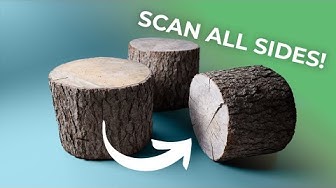
How to 3D Scan All Sides of Objects - RealityCapture

How (and why) to take a logarithm of an image

The Search for the blackest black - How BLACK is the BLACKEST PAINT?

Material from WEB image (Substance Alchemist - A.I.Gigapixel)

Why Do Predators Ignore Sleeping Humans?
